Outline
Penetrometers are field probes that are pushed into the soil. Modern penetrometers record different soil properties using microelectronic controllers and can indirectly observe physical, chemical and biological properties. There are even penetrometers with built-in spectral sensors that can record the soil profile spectra as the penetrometer is pushed into the soil. In AI4SH only a simple type of steel pinned penetrometers are used (figure 1).
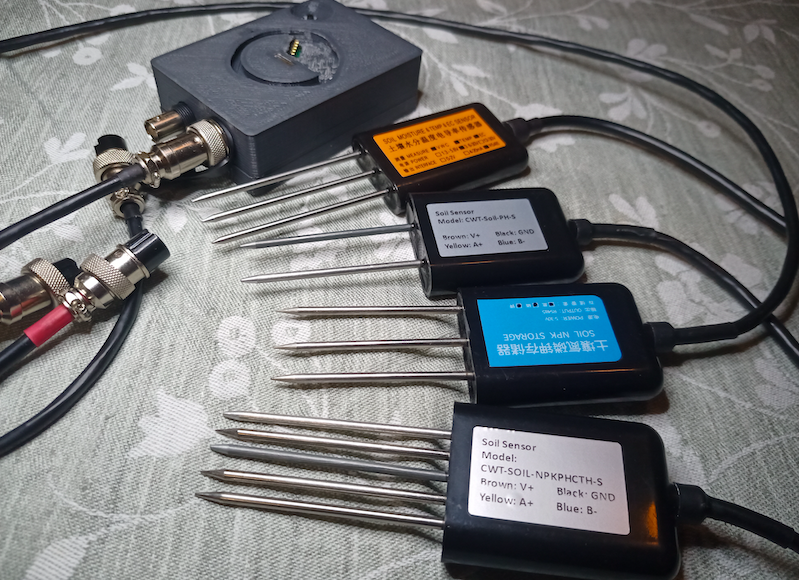
The soil properties that can be observed with the AI4SH adopted soil penetrometers include:
- soil moisture,
- temperature,
- electric conductivity,
- salinity,
- epsilon,
- nitrogen (N),
- phosphorus (P),
- potassium (K), and
- pH.
A main reason for applying soil penetrometers as part of AI4SH is that soil moisture is a required parameters for interpreting and modelling soil spectra acquired from wet (non-dried) samples. As salinisation is a severe soil health problem, also the direct field observations of electric conductivity, salinity and epsilon are of interest. The probing of NPK and pH are more indicative, but as these chemical soil properties can be captured simultaneously with those of primary interest, they are also included in the database schema penetrometer.
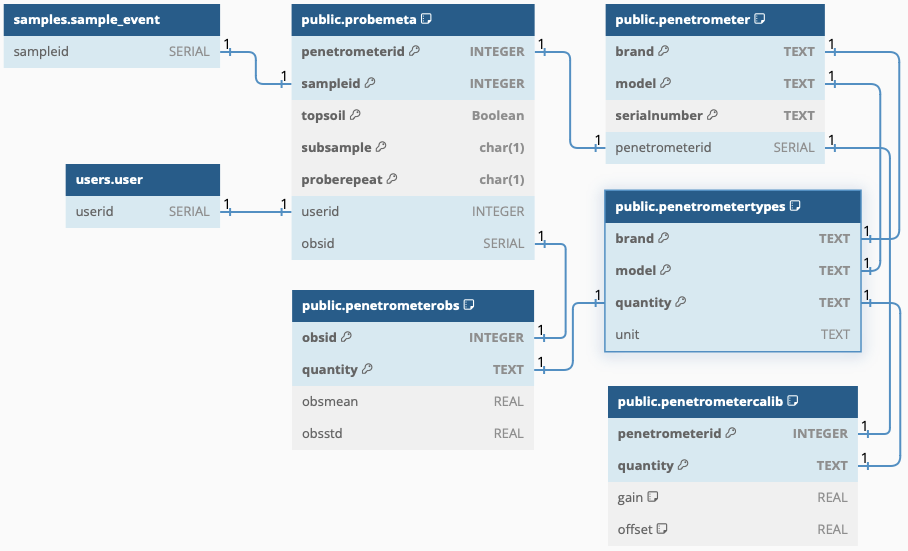
As with spectrometers, each individual penetrometer has a slightly different response and thus needs an individual calibration. The table penetrometer is for registering each individual instrument, the table penetrometertypes for registering the physical quantities and units observed by each type of (brand+model) of penetrometer, and the table penetrometercalib for storing the (optional) calibration settings.
The meta data for each penetrometer observation is stored in the table probemeta. The table is prepared for accepting multiple observations for each single sample (field: proberepeat). Observations can be done either in the field or using mixed (wet) samples, recorded in the field subsample with a single letter (M, C, N, E, S, W for Mixed, Central, North, East, South and West). The alternative options for penetrometer observations leads to a metadata table with a large number of primary keys (pk):
- penetrometerid (the probe)
- sampleid (the sample event)
- topsoil (topsoil or subsoil)
- subsample (Mixed, Central, North, East, South or West)
- scanrepeat (sequence from 1 to maximum 9)
The actual observation data is saved in the table penetrometerobs. The link between probemeta and penetrometerobs is a unique (SERIAL) id set for each individual observation (obsid). The link to the penetrometer is also via a SERIAL id (penetrometerid). As for other schemas, the user responsible is linked to each observation via the userid.
DBML
// Use DBML to define your database structure
// Docs: https://dbml.dbdiagram.io/docs
// Tool: https://dbdiagram.io/d

Project project_name {
  database_type: 'PostgreSQL'
  Note: 'AI4SH schema for penetrometer data'
}

Table users.user {
  userid SERIAL
}

Table samples.sample_event {
  sampleid SERIAL
}

Table penetrometer {
  brand TEXT [pk]
  model TEXT [pk]
  serialnumber TEXT [pk]
  penetrometerid SERIAL
}

Table penetrometertypes {
  brand TEXT [pk]
  model TEXT [pk]
  quantity TEXT [pk]
  unit TEXT
}

Table penetrometercalib {
  penetrometerid INTEGER [pk]
  quantity TEXT [pk]
  gain REAL [DEFAULT: 1]
  offset REAL [DEFAULT: 0]
}

TABLE probemeta {
  penetrometerid INTEGER [pk]
  sampleid INTEGER [pk]
  topsoil Boolean [pk]
  subsample char(1) [pk]
  proberepeat char(1) [pk]
  userid INTEGER
  obsid SERIAL
}
// topsoil (true) represents 0-20 cm, subsoil (false) represents 20-50 cm.
// subsample can be M (mixed), C (central), N (north), E (east), S (south) of W (west).
// proberepeat is a simple numbering starting a 1 to a maximum 0f 9 repeats for the same sample

TABLE penetrometerobs {
  obsid INTEGER [pk]
  quantity TEXT [pk]
  obsmean REAL
  obsstd REAL
}

REF: samples.sample_event.sampleid - probemeta.sampleid

REF: users.user.userid - probemeta.userid


REF: "public"."penetrometer"."penetrometerid" - "public"."probemeta"."penetrometerid"

REF: "public"."penetrometertypes"."brand" - "public"."penetrometer"."brand"

REF: "public"."penetrometertypes"."model" - "public"."penetrometer"."model"

REF: "public"."penetrometer"."penetrometerid" - "public"."penetrometercalib"."penetrometerid"

Ref: "public"."probemeta"."obsid" - "public"."penetrometerobs"."obsid"

Ref: "public"."penetrometertypes"."quantity" - "public"."penetrometerobs"."quantity"

Ref: "public"."penetrometertypes"."quantity" - "public"."penetrometercalib"."quantity"
Figure